 Biz-Email Docs
AI assistant integration (MCP)
Let an MCP-capable AI assistant add contacts to Biz-Email.
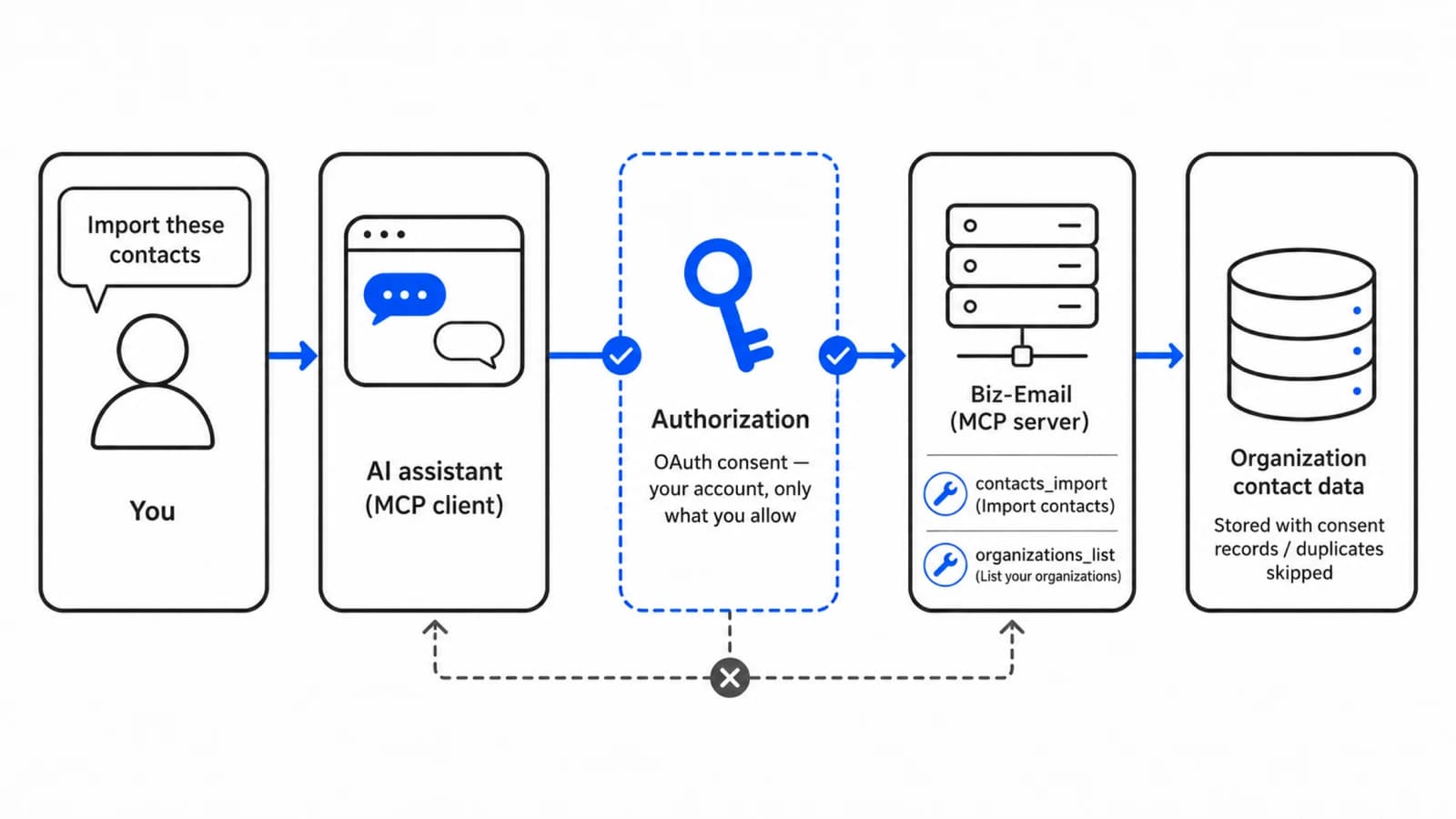
Biz-Email exposes an MCP (Model Context Protocol) server. Connect an MCP-capable AI assistant and a request like "import the contacts from this business card" can add them to Biz-Email for you.
Connect
The endpoint is:
https://www.biz-email-powered.site/api/mcpWith Claude Code, for example, register it like this:
claude mcp add --transport http biz-email https://www.biz-email-powered.site/api/mcpRegistering alone grants no access. The first time the assistant tries to use a tool, you are taken through sign-in and consent.
How authorization works
The assistant acts as you, and only within what you allowed. Your password is never given to the assistant.
Nothing beyond what you consented to
A call that lacks the permissions shown on the consent screen is rejected even with a valid sign-in. Nothing beyond importing contacts and listing your organizations is possible.
What it can do
| Tool | What it does |
|---|---|
contacts_import | Import contacts in bulk (up to 100 per call) |
organizations_list | List the organizations you belong to, oldest membership first |
Neither modifies nor deletes existing contacts. Addresses that already exist are skipped as duplicates, so repeating the same request does not add them twice.
A consent record is required
When contacts are imported, the basis for emailing them is always recorded alongside. Importing without a basis is not possible.
| Recorded | Content |
|---|---|
| Basis | The recipient opted in, or a legal exception that allows sending without prior consent applies |
| Obtained at | When consent was given, or when the qualifying relationship began. Time zone required; future dates rejected |
| Source | A description such as "business cards exchanged at a trade show" |
All three are given as the default for the whole call. A contact can carry its own record to override the default for that row, and when every row carries one the call-level default can be omitted (this is what reading an exported CSV back in looks like).
A row with neither the call-level default nor its own record is not imported. It comes back in the result as invalid, with the reason.
For the reasoning behind this, see How delivery works.
Which organization contacts land in
Contacts are separated per organization. The destination is decided in this order:
- The organization named in the request, if any (your membership is verified at that moment)
- Otherwise, the default import destination chosen in settings
- If no default is set, or it is no longer valid (for example after removal), the oldest organization you belong to
The default is changed on the organization settings screen in the app. The organization currently open in your browser has no effect. Requests from an AI assistant arrive over a separate path from the browser screen.
Reading the import result
Each contact is reported as one of:
| Result | Meaning |
|---|---|
| Imported | Newly registered |
| Skipped duplicate | Already registered, or repeated within the same request (this is not an error) |
| Invalid | Could not be registered — for example a malformed address (a reason is given) |
Addresses are stored lower-cased, so addresses differing only in case are treated as the same person.
Last updated on